
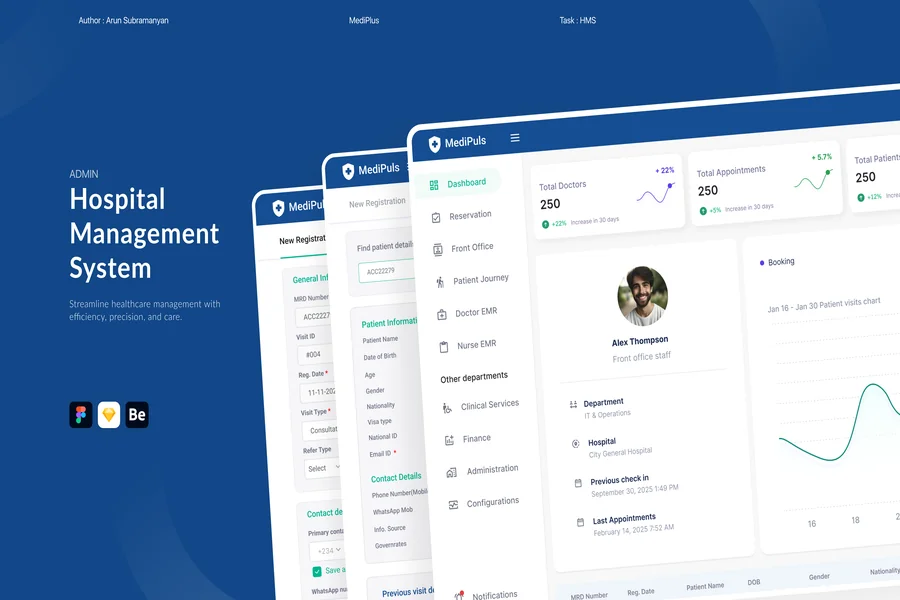
One of the most complicated software environments that can be encountered is a hospital management system. It must be able to accommodate doctors nurses administrators billing staff and patients all at the same time and in settings where mistakes can be detrimental. It is not a cosmetic issue to get the hospital management system UI right. It has a direct impact on the rate at which care is provided, the accuracy of information documentation and the mental burden an employee has during a shift.
The reason why UI Design is so Important in Healthcare Software.
Poor software in the majority of industries is exasperating. Healthcare bad software is life threatening. Nurses that have to navigate through several screens before entering a medication dose are less productive and more likely to make a mistake. Physicians that are unable to locate the history of a patient in regard to allergies promptly are taking an unwarranted risk in case of an emergency.
An appropriately developed hospital management system UI minimizes cognitive load. It brings to the fore the appropriate information at the appropriate time and maintains workflows without any redundant processes. Each extra click and inappropriate label is time and focus wasted where it is most needed in a place where time and focus are valued.
Thoughtful design is not only worthwhile but something that is essential due to the stakes.
Basic Rules of an effective HMS UI design.
There are several design principles that are applicable to healthcare software environment.
The first rule is against cleverness and in favor of clarity. Hospital software users are anyone subjected to a twelve-hour shift and under stress. This is not where smartness and veiled menus are to be found. All the elements must be instantly apparent in their intent.
Information pecking order is critical. Essential data – allergies active medications current vitals should be easily noticeable. The name and ID of a patient should not be something that needs to be searched. Color coding may be utilized but with consistent use but should not be the sole status indicator as the users who have color blindness require the same access.
Unity minimizes training time and mistakes. By having all modules in the system employ the same patterns to the same actions that users take the muscle memory gets built. When the booking of appointment system operates in a totally different way as the discharge process staff has to re-learn patterns consciously, they will have a chance to make mistakes.
Design goals that should be measured explicitly include minimal steps to critical tasks. What is the number of clicks to place an order of a medication? What number of screens to go to the surgical schedule of to-day? Harmonizing high frequency tasks is also beneficial in efficiency in hundreds of daily interactions.
Important Modules and their UI Requirement.
A hospital management system normally consists of a number of different modules, which have their own UI requirements.
The initial touch point is sometimes patient registration module. It must be able to process data entry fast with validation to detect mistakes such as the wrong date format or missing mandatory fields in real time and not after the data has been entered.
Clinical staff use the electronic health record or EHR view the most. It should display all the past history of the patient, up-to-date orders and notes in a quick scan format. The tabbed layouts with well defined section headings would be good here. The most recent information ought to be the most important, and it should not be scrolled.
The appointment scheduling module has the advantage of visual calendar interfaces that have clear indicators of the available times of a booked slot and urgent appointments. The drag-and-drop rescheduling is much less frictional than form-based rescheduling.
Billing and insurance module is mostly utilized by administrative personnel. In this case accuracy is the most important factor. Categorization of insurance code of break down of charges and claim status must be displayed in formats that are easily seen and not submitted in errors.
The pharmacy module should have quick search i.e., by drug name generic name and by code and allergy interaction warning should be prominent and should not be easily overridden.
Hospital Management Systems: Accessibility.
Accessibility is not a key consideration in enterprise software but it is especially vital in healthcare.
HMS platforms are used by staff who are at different levels of technical comfort. Others are extremely techno savvy. Others can be more seasoned clinicians who are not as familiar with software interfaces. The system should be compatible to both without having to look down on either.
The fonts used should be legible in daylight clinical conditions and in wall mounted displays. The touch targets should be big enough to be tapped precisely particularly on tablet interfaces that are used clinically.
Accessibility to screen readers is important to the visually impaired. The users should have the ability to use high contrast mode.
Mobile and Tablet considerations.
The use of tablets and mobile devices by clinical staff in the bedside is on the rise. A responsive designed hospital management system that is tailored to these form factors can allow the workflows to be more flexible.
Tablet interfaces require bigger touch targets to make navigation easier and pay attention to what functions are best suited at the bedside as opposed to a workstation. All the desktop functionalities do not have to be displayed on the mobile but essential tasks such as order recording to note vitals and patient records should work perfectly on touch screens.
The Data Visualization in HMS.
Clearly visualized data dashboards enable the administrators and charge nurses to control workflows within a single glance.
The admission and discharge rates, and emergency department wait times displayed in bed occupancy charts are easily read and understood visually compared to the numbers displayed in the table. Status indicators: Color-coded capacity indicators (green: normal, yellow: approaching capacity, red: full) are status indicators that do not need users to read capacity indicators to identify their status.
Patient flow dashboards indicate where patients are in the care pathway and coordinate care across departments and eliminate bottlenecks.
Final Thought
UI design is a profession that involves software designers and clinical staff to cooperate in designing the hospital management system. The most appropriate systems are developed by the constant feedback of the individuals who have to use them on a daily basis. User experience design is not a luxury to invest in, and in health care software it is a necessity towards safe efficient care delivery. When interface operates in a manner that clinical staff believe the entire organization operates more effectively.
FAQs
Q: What is the most important feature in a hospital management system UI? Quick access to patient records including current medications allergies and active orders is the most critical. Clinical staff need this information fast and accurately especially in emergencies.
Q: How does UI design affect patient safety? Poor UI design contributes to medication errors misread records and delayed care. A well-designed interface reduces cognitive load and makes critical information instantly visible reducing the chance of mistakes.
Q: Should a hospital management system work on mobile devices? Yes. Clinical staff increasingly use tablets at the bedside. Core functions must work reliably on touch interfaces with appropriately sized controls and simplified navigation.
Q: How should color be used in HMS interfaces? Color should reinforce meaning rather than carry it alone. Use color to highlight critical alerts or status indicators but ensure the same information is also conveyed through labels or icons for users with color vision differences.
Q: What is the benefit of user testing for hospital management systems? Testing with actual clinical staff before deployment reveals usability issues that designers miss. Even small friction points in high-frequency tasks accumulate into significant time loss across a full day of hospital operations.
