
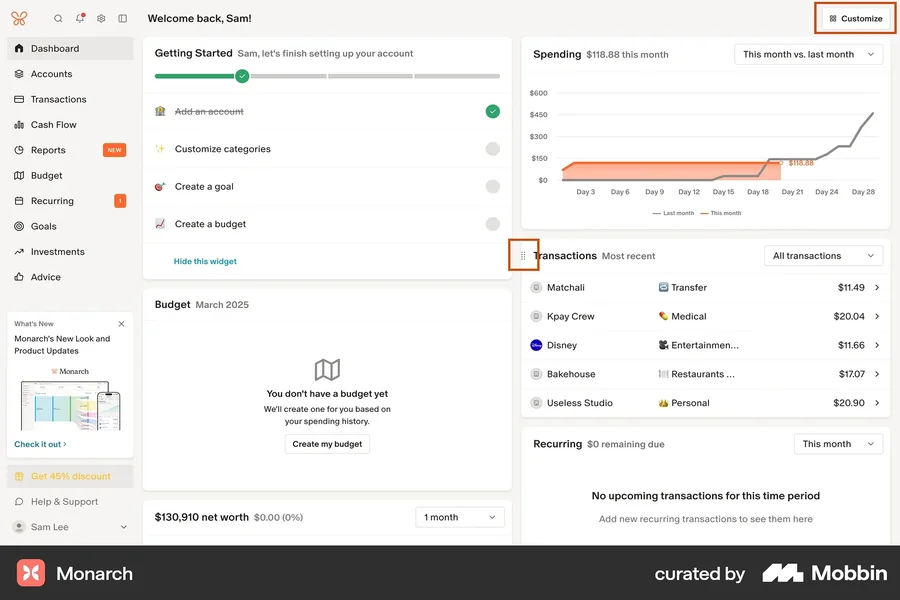
A SaaS dashboard is a screen that is likely to be the initial one displayed after the user logs in and one that might be revisited dozens of times each day. Among the most crucial issues of product development is getting it right. An ineffective dashboard irritates users with putting valuable information below the clutter and leads to churn. A great one is made the control center and makes your product indispensable. Knowing how to build a SaaS dashboard the right way is the difference between having a product that keeps users and one that isn’t.
What a SaaS Dashboard should do in fact.
Prior to considering the layout or aesthetic it is good to be purposeful. The user should get an immediate impression of what is going on and what needs to be done and what has changed since the last visit provided by a dashboard.
It is not where to demonstrate all the things that the product can do. It is an edited selection of the information and actions that are the most useful in the purpose of the user. The task of a dashboard is to save the user time to know his/her current position and to perform his/her next move – not to impress with the amount of information.
Before You Design anything, Understand Your users.
The biggest error in designing a dashboard is that most designers are creating designs based on a hypothetical user as opposed to a real user. The same product requires two totally different information in the different roles.
A SaaS marketing manager requires performance data of the campaign. A finance director requires a summary of bills and cost trends. An administrator must have user management and health of the system. It is a bad idea to design a single dashboard that attempts to accommodate all of these at the same time, as this will not benefit any of them.
Begin with user research. Discuss with real users what they view when they log in what decisions they make and what information they require to make the decision. This study is a direct indicator of what should be displayed on the dashboard and what is left to be done on the further pages.
The user role definitions or personas aid in organizing these insights into design choices. A three-user dashboard will be much more effective to users with three well-defined roles than one based on assumptions.
Create Good Visual Hierarchy.
After you have received information, which should be displayed on the dashboard, the next task is to make it so that it is displayed in its form which directs attention easily.
Visual hierarchy refers to the importance of the information being visual. Bold fonts and comparatively large font size of crucial measurements. Contextual aiding of smaller subdued treatment. Call-to-action items that were well separated and distinguished by informational displays.
F-pattern and Z-pattern are good patterns to begin with layout. Users with western reading culture scan left-top. Information that is the most important should be located in the upper left section of the dashboard that has the eyes automatically landing on the first.
Space out and use smaller containers to present group related information in a visual form. Onboarding progress widget must not be isolated at the top of the page and activation metrics together with irrelevant information should be located together on the page.
Select Metrics Carefully-Less is More.
Any SaaS solution outputs greater data than can be displayed on a dashboard. Selecting what to surface is as crucial as the way of displaying it.
Pay attention to action-oriented measures. The ability to have several users view and instantly determine whether they should do something or not is a plus. An interesting number, which makes no difference in their usage of the product, is likely to be out of place in the main dashboard.
Do not use vanity measures – numbers that look impressive, but have no relationship to the health of the product or its success with the user. Monthly active is good but daily active and retention rate are telling a more truthful tale of engagement.
Adding trend indicators and raw numbers to consider. An up-to-date figure of revenues is handy. The same figure having a small arrow of the direction of change compared to the last month is much more helpful.
Dashboard navigation design of SaaS dashboards.
The dashboard typically is embedded in a larger navigation framework. The design of the navigation influences the navigation between the dashboard and the more in-depth areas.
The most prevalent pattern of SaaS products and justifiably so is left sidebar navigation. It maintains navigation being seen without taking up top-page space and is easily scaled as products have more sections.
Top navigation is more effective with products having fewer sections or where horizontal space is not a significant issue. Other products also have both- a top bar containing account-level controls and a left sidebar containing feature navigation.
Breadcrumbs enable users to navigate in detail pages of the dashboard. Being aware of your position and route back will decrease mental load.
Collapse and expand feature of the sidebar is becoming more and more popular by letting users recapture horizontal space when viewing data-intensive displays.
The right way to do data visualization.
Patterns in data can be seen with the help of charts and graphs and are poorly selected visualizations which are more confusing than clarifying.
Select the type of visualization to the data. Time trend line charts. Comparison bar charts of categories. Pie charts can only be used to display composition with few slices only – not with numerous segments which make them illegible. Detailed data tables that the user has to scan and refer to as opposed to obtaining an overview of the pattern.
3D charts should not be decorated with gradients and unneeded visuals. The most effective dashboards have reserved designs which do not adorn the data; instead, they allow the data to talk.
Interactive features – hover tooltips date range filters and filtering – provide a lot of value without filling out the static display. Allow users to dive into details as needed and not display everything at once.
Performance and loading Experience
A slow-loading dashboard is a killer to trust. Users that look at important metrics must not have to wait several seconds before the page loads.
Have important content that should be loaded above-the-fold. Don’t use blankness or spinners as the default instead use skeleton screens, which are shape elements that display as data is loaded.
Store dashboard information to where it is due. Hourly-updating metrics do not require a new query of the database each time the page is loaded. Dynamic loading of real-time data such as the number of visitors is valuable but the vast majority of dashboard indicators should be allowed to be cached.
Final Thought
The key to designing a SaaS dashboard well is knowing how to be disciplined, both in knowing what the users actually need and in displaying it in an easily understandable manner and not a way that is hard to understand and impressively presented. Define the right metrics are established with user research, visual hierarchy and performance-based building Start. The feeling of being told what to do at a glance and feeling confident makes users engage in retention and the type of word-of-mouth that produces products. Get the dashboard correct and you will have more strength in the rest of your product.
FAQs
Q: How many metrics should a SaaS dashboard show? There is no fixed number but five to ten key metrics is a reasonable target for a primary dashboard. Too few feels incomplete. Too many creates overwhelm. Prioritize metrics that drive decisions.
Q: Should a SaaS dashboard be customizable by users? Customization adds value for products with diverse user needs but adds development complexity. A good default dashboard serving most users well is more important than perfect customization for every edge case.
Q: What is the best layout for a SaaS dashboard? A card-based layout with clear sections left sidebar navigation and key metrics in the upper area works well for most SaaS products. The best layout depends on the specific data being presented and the user’s primary tasks.
Q: How do I decide what goes on the main dashboard versus secondary pages? Ask whether a piece of information needs to be seen on every visit or only occasionally. Frequent and action-driving information belongs on the dashboard. Detailed historical analysis and configuration belong in dedicated sections.
Q: What design tools are commonly used for SaaS dashboard design? Figma is the dominant tool for UI design including dashboards. It supports component libraries collaborative editing and prototyping. Sketch remains used but Figma has largely become the industry standard.
